Is HEIC Lossless? Understanding iPhone Photo Compression
Quick Answer
No, HEIC is not lossless. HEIC uses lossy HEVC compression that discards some image data to achieve 50% smaller file sizes. However, the quality loss is imperceptible to human vision. For true lossless quality, convert HEIC to PNG.
HEIC Compression Explained
HEIC (High Efficiency Image Container) uses HEVC (H.265) compression, the same technology used for 4K video streaming. This compression is lossy, meaning it permanently discards some image data to reduce file size.
Key Point: "Lossy" doesn't mean "low quality." HEVC is incredibly efficient at identifying and removing only the data humans can't perceive, resulting in files that look identical to the original despite being 50% smaller.
Visual Comparison: HEIC vs Other Formats
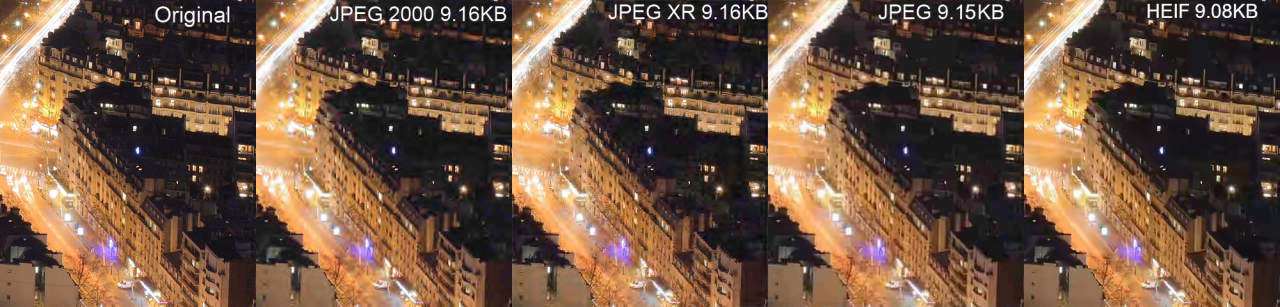
File size comparison: HEIF/HEIC achieves the smallest file size while maintaining excellent visual quality
As you can see, HEIF (the format HEIC uses) produces the smallest file size while maintaining quality that's visually indistinguishable from the original.
Lossy vs Lossless: What's the Difference?
| Aspect | Lossy (HEIC, JPEG) | Lossless (PNG, TIFF) |
|---|---|---|
| Data Preservation | Discards some data | Keeps all data |
| File Size | 50-90% smaller | Much larger |
| Visual Quality | Imperceptible loss | Perfect |
| Editing | Quality degrades with each save | No degradation |
| Best For | Photos, sharing | Graphics, archival, editing |
How Much Quality Does HEIC Actually Lose?
The quality loss in HEIC is imperceptible to human vision under normal viewing conditions. Here's what the data shows:
- PSNR (Peak Signal-to-Noise Ratio): HEIC typically achieves 40+ dB, considered "excellent" quality
- SSIM (Structural Similarity): 0.98+ out of 1.0, meaning 98%+ structural similarity to original
- Human perception studies: Most viewers cannot distinguish HEIC from uncompressed originals
Real-world example: A 12MP iPhone photo at 4032x3024 pixels is about 24MB uncompressed. HEIC reduces this to ~1.5MB (94% reduction) with no visible quality difference. The same photo as JPEG would be ~3MB at comparable quality.
When Do You Need Lossless?
While HEIC quality is excellent for most purposes, there are situations where true lossless formats like PNG are better:
- Professional photo editing - Each edit/save cycle in lossy formats degrades quality
- Long-term archival - Lossless ensures no degradation over time
- Graphics with text - Lossy compression can blur sharp edges
- Screenshots - PNG preserves crisp UI elements
- Images with transparency - PNG handles alpha channels better
- Medical/scientific imaging - Where every pixel matters
HEIC Quality Comparison Table
| Format | Compression | Typical File Size (12MP) | Quality |
|---|---|---|---|
| RAW/DNG | Lossless | 25-50 MB | Perfect |
| PNG | Lossless | 8-15 MB | Perfect |
| HEIC | Lossy | 1.5 MB | Excellent |
| JPEG (90%) | Lossy | 2.8 MB | Very Good |
| WebP | Lossy/Lossless | 1.8 MB | Excellent |
How to Get Lossless from iPhone Photos
If you need truly lossless iPhone photos, you have several options:
Option 1: Use Apple ProRAW
Available on iPhone 12 Pro and later, ProRAW captures uncompressed sensor data. Files are 25-50MB each but preserve maximum quality and editing flexibility.
Option 2: Convert HEIC to PNG
While this won't recover data already lost in HEIC compression, it prevents any further quality loss. PNG is ideal when you need to edit or share without additional compression. Convert HEIC to PNG free →
Option 3: Change iPhone Settings to JPEG
Go to Settings > Camera > Formats > Most Compatible. Note: This uses more storage and JPEG isn't lossless either - it's just more compatible.
Need Lossless Quality? Convert to PNG
Our free converter transforms HEIC to lossless PNG format - no additional quality loss.
Convert to PNG FreeFrequently Asked Questions
Is HEIC lossless?
No, HEIC is not lossless. It uses lossy HEVC compression that permanently discards some image data to achieve smaller file sizes. However, the compression is so efficient that the quality loss is imperceptible to human vision in most cases.
Does HEIC lose quality?
Technically yes, but practically no. HEIC's lossy compression removes only imperceptible image data. At iPhone's default quality settings, studies show most people cannot distinguish between HEIC and uncompressed originals.
Is HEIC better quality than JPEG?
Yes, HEIC provides better quality than JPEG at the same file size. HEIC uses more advanced HEVC compression and supports 16-bit color depth (vs JPEG's 8-bit), resulting in smoother gradients, better skin tones, and more accurate colors.
What is the best lossless alternative to HEIC?
PNG is the best widely-compatible lossless alternative. When you convert HEIC to PNG, no additional quality is lost and the PNG preserves all remaining image data. For professional work, consider RAW/DNG formats.
Does converting HEIC to PNG improve quality?
No, converting HEIC to PNG doesn't improve quality - you can't recover data already discarded by HEIC compression. However, PNG prevents any additional quality loss, making it ideal for editing or archiving converted photos.
Is iPhone camera quality lossless?
No, iPhone cameras save photos in HEIC format by default, which uses lossy compression. For true lossless capture, use ProRAW (iPhone 12 Pro and later) which saves uncompressed sensor data at 25-50MB per photo.
Should I convert HEIC to PNG for archival?
It depends. If you've already taken photos in HEIC, converting to PNG preserves the current quality and prevents further degradation. For truly important archival, shoot in ProRAW from the start. For everyday photos, HEIC's quality is sufficient.
How much smaller is HEIC than lossless PNG?
HEIC is typically 4-5x smaller than PNG for the same image. A 12MP photo might be 1.5MB in HEIC vs 8MB in PNG. This efficiency is why Apple chose HEIC - you can store 4-5x more photos in the same storage space.